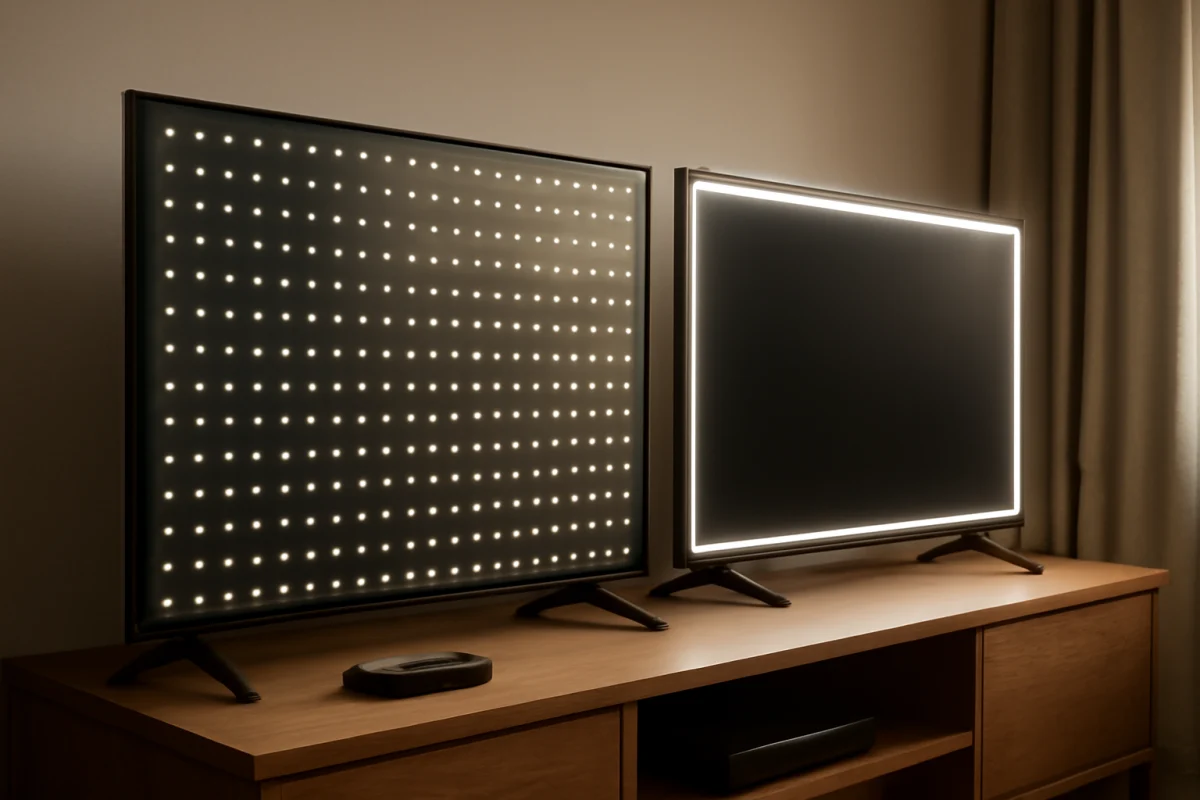
The main difference between direct-lit and edge-lit LED TVs is where the LEDs sit behind the LCD panel. Direct-lit TVs place LED lights across the back of the screen, while edge-lit TVs place them along the edges and spread light toward the center. That design affects brightness consistency, black levels, TV thickness, and the way screen problems appear.
Neither backlight type automatically makes a TV better for every viewer. A well-designed edge-lit model can look better than a poorly tuned direct-lit model, and other factors—such as local dimming, panel type, image processing, and calibration—often matter just as much. If you are comparing two TVs, check the complete display design rather than relying only on the backlight label.
What is a direct-lit LED TV?
A direct-lit LED TV has a layer of LEDs positioned behind the LCD panel. The lights are distributed across the rear of the screen, although the exact number and spacing vary by model. The LEDs illuminate the liquid crystal layer, which controls how much light reaches your eyes.
Direct-lit should not automatically be confused with full-array local dimming. A direct-lit TV may use a basic backlight that changes brightness for the entire screen. A more advanced design can divide the rear LEDs into zones and dim some areas independently. Manufacturers may describe that feature with terms such as local dimming or full-array local dimming, but the implementation differs by model.
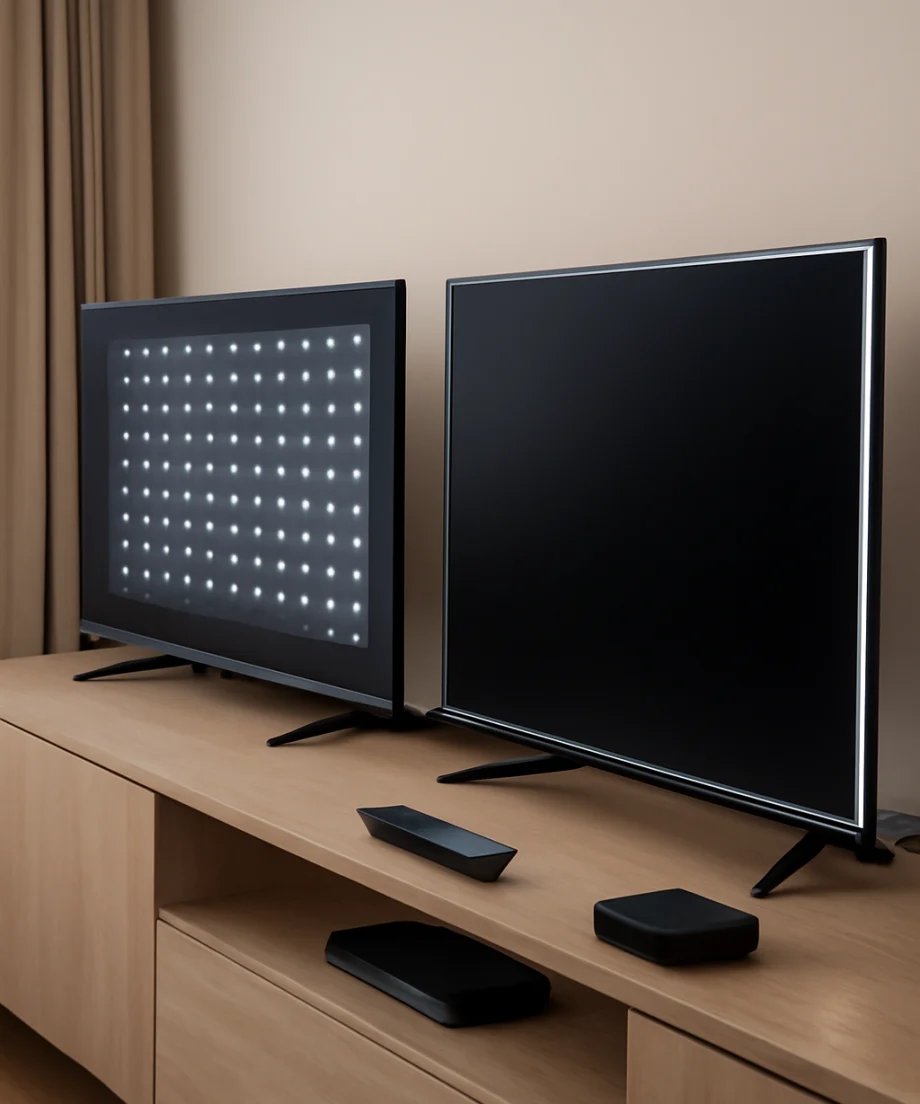
Because the LEDs are behind the panel, direct-lit TVs can produce more even illumination than some basic edge-lit designs. However, uniformity still depends on the panel, diffuser layers, software, manufacturing tolerances, and how the TV is used.
What is an edge-lit LED TV?
An edge-lit LED TV places its LEDs around one or more edges of the display rather than covering the entire rear surface. A diffuser or light guide spreads that light across the panel so the image appears illuminated from behind.
Edge lighting allows manufacturers to build thinner and sometimes lighter TVs. It can also use less space behind the screen, which may help with cabinet design. On the other hand, the light has farther to travel to reach the middle of the display. If the diffuser or backlight is not distributing light evenly, you may notice brighter areas near the edges, darker corners, or uneven brightness across large solid colors.
Some edge-lit TVs include a form of local dimming, but the zones are usually arranged along the edges and may not control the image as precisely as a well-designed full-array system. The exact result depends on the model, so the term edge-lit alone does not predict picture quality.
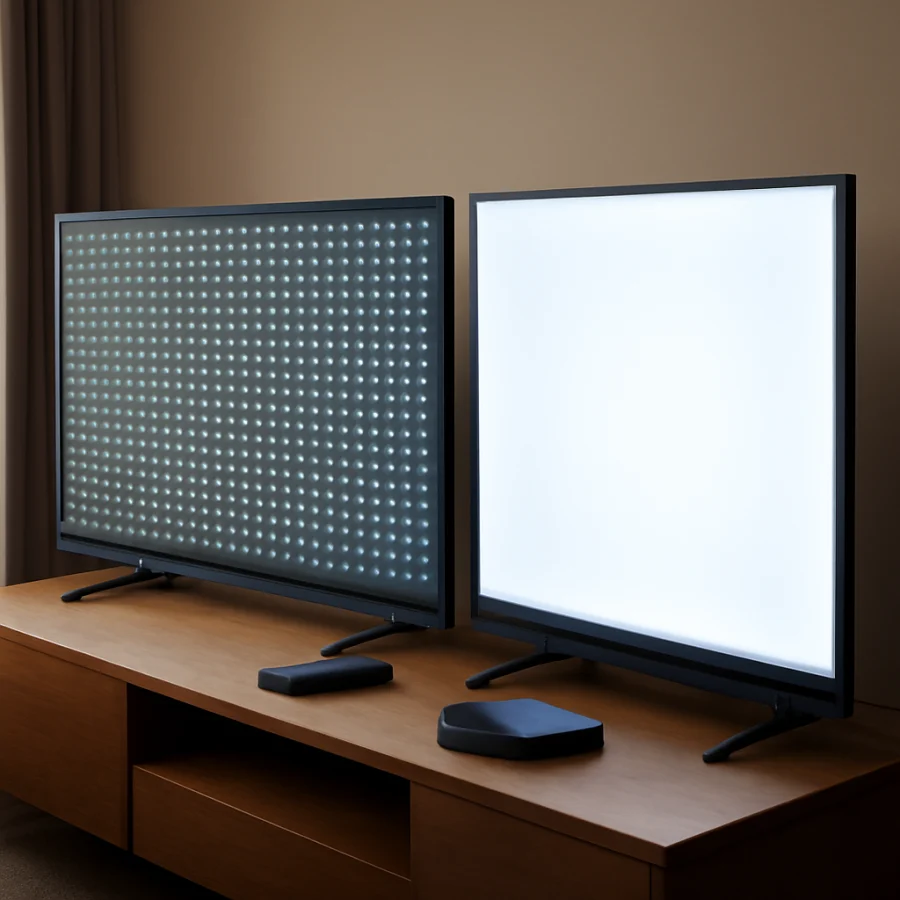
Direct-lit vs. edge-lit: the practical differences
Brightness and screen uniformity
Direct-lit designs have a natural advantage when a manufacturer wants to distribute light across a large screen. Since the LEDs are located behind the panel, the backlight does not have to travel as far from the outer edges to the center. This can help reduce some types of uneven illumination.
Edge-lit TVs can still be bright, especially when they use a good light guide and careful factory tuning. Their potential weakness is uniformity. A bright strip near the edge, a dim center, or cloudy-looking areas may be easier to see when watching hockey, skiing, a bright sky, or a blank input screen.
Uniformity varies from one unit to another. Do not assume every TV with the same backlight design will look identical. If you already own a TV and see uneven lighting, test several sources and picture modes before deciding that the backlight has failed.
Black levels and contrast
Backlight placement can influence contrast, but it is not the only factor. LCD pixels do not create their own light, so the TV must limit the backlight when displaying dark content. A basic direct-lit or edge-lit TV may raise the backlight for the whole screen, causing dark scenes to look gray.
Local dimming can improve contrast by reducing light behind darker parts of the image. Full-array local dimming generally offers more control because the LEDs are spread behind the screen. Edge-lit local dimming may be limited by the position of the LEDs, which can create halos, bright bars, or uneven transitions around subtitles and bright objects.
Even with local dimming, no LCD TV produces perfect pixel-level control. If you want extremely precise control of individual pixels, you would need to compare LCD designs with self-emissive display technologies rather than focusing only on direct-lit versus edge-lit.
TV thickness and design
Edge-lit TVs are often thinner because the LED assemblies sit around the perimeter instead of taking up space across the entire rear panel. This can make the screen look more streamlined when mounted on a wall.
Direct-lit TVs may need a deeper cabinet to fit the rear LED array, diffuser layers, and related components. The difference is not always dramatic, and a thin direct-lit TV may still be available. Check the manufacturer’s dimensions for the specific model, including the stand and wall-mount depth.
Power use
Power consumption depends on screen size, brightness, picture mode, energy settings, panel technology, and how the backlight is controlled. It is not safe to assume that every edge-lit TV uses less electricity than every direct-lit TV.
If power use matters, check the television’s current energy information and compare models at similar screen sizes and brightness settings. Lowering the backlight can reduce energy use on either design, but it also changes the picture’s brightness.
How local dimming changes the comparison
Local dimming is one of the most important features to check when comparing backlight designs. It divides the backlight into controllable areas. When the image contains a dark region, the TV can dim the corresponding area while keeping a bright object visible elsewhere.
A direct-lit TV with no local dimming may not deliver better contrast than an edge-lit TV with effective dimming. Conversely, a direct-lit model with many well-controlled zones may handle dark scenes more convincingly than a basic edge-lit model.
Local dimming can also introduce side effects. You may see a glow around bright objects on a dark background, brightness changes when subtitles appear, or small details disappearing in very dark scenes. These effects are more noticeable in a dark room and can vary by picture mode. If you are comparing models, look for independent testing or view demanding content in person when possible.
Which backlight is better for your room?
Choose based on your viewing conditions rather than the label alone.
- For a thin wall-mounted TV: An edge-lit model may fit your design goals, especially if the room is not used for critical movie watching.
- For dark-room movie viewing: Give priority to contrast and local-dimming performance. A direct-lit full-array model may be a stronger choice, but verify its actual performance.
- For bright rooms: Compare measured or demonstrated brightness, reflection handling, and viewing angle. Backlight placement by itself does not determine daytime performance.
- For sports and large bright scenes: Pay attention to uniformity. Uneven backlighting can be distracting across fields, ice rinks, and other broad areas of similar color.
- For a secondary room: A basic edge-lit or direct-lit TV may be perfectly adequate for news, casual streaming, and everyday viewing.
For more display terminology and buying guidance, browse the Tech & Specs section on TV Fix Guide.
How to identify the backlight problem you are seeing
Before blaming the LED layout, check whether the issue appears on every source. Open a built-in app, try another input, and compare a dark scene with a bright scene. If the problem appears only on one device, cable, or app, the TV backlight may not be the cause.
Next, try a different picture mode and reduce extreme settings temporarily. Excessive backlight brightness, contrast enhancement, or dynamic picture processing can make blooming and uneven areas easier to see. Menu names and available controls vary by brand and model, so use the descriptions in your TV’s manual rather than copying a setting from another television.
Look at the screen straight on in a normally lit room. Viewing from an angle can make LCD uniformity and contrast appear worse. Avoid pressing on the panel or attempting to open the TV. The screen is fragile, and the power supply and backlight circuits can contain hazardous voltages even when the TV is unplugged.
If a dark patch, bright strip, flickering area, or group of LEDs remains visible across multiple sources and picture modes, document the problem with photos or video. Keep the TV model and serial information available, then check the seller or manufacturer’s support options. Repairability and coverage depend on the exact model and region.
Common questions about direct-lit and edge-lit TVs
Is direct-lit better than edge-lit?
Not in every case. Direct-lit can offer more even rear illumination and may support stronger local dimming, but an edge-lit TV may be thinner and can produce an excellent picture when its diffuser and processing are well designed.
Does direct-lit mean full-array?
No. Direct-lit describes the location of the LEDs behind the panel. Full-array local dimming describes a more specific backlight arrangement with separately controlled zones. Confirm the exact features for the model you are considering.
Can edge-lit TVs have local dimming?
Yes, some do. Edge-lit local dimming is generally constrained by the location of the LEDs, so its behavior can differ from full-array local dimming. Check reviews or hands-on testing for the specific TV.
Can a backlight be repaired?
Backlight repairs may be possible, but the difficulty and cost depend on the TV’s construction and the failed component. A single defective LED can sometimes cause a dark section or blinking backlight, but diagnosing it usually requires opening the panel. If the TV is under coverage, seek authorized support before attempting repair.
What to check before buying
When comparing two LED TVs, check the backlight type, local-dimming feature, screen uniformity, contrast performance, viewing angle, reflections, dimensions, and warranty or return terms that apply in your area. Read independent reviews when available, because manufacturers may use different names for similar technologies.
The best choice is the TV that matches your room and viewing habits. Direct-lit models are often worth considering when contrast and uniformity matter, while edge-lit models can be attractive when a thin design is the priority. In both categories, the specific implementation matters more than the label alone.
Comments
0No comments yet. Be the first to share a helpful note or question.
Leave a Comment
Your email address will not be published. Comments are reviewed before appearing on the site.